From New Project to a working application
An empty project leaves a surprisingly large question unanswered: how does a domain model become something a person can actually use? The 0.5.0 project wizard can now answer that with a small, complete application.
Choose Spring Boot Web Application under New Project → Vernac. The generated Small wins workspace has a responsive Thymeleaf interface, a PostgreSQL database, Flyway migrations, real usecases and a small test suite. It contains one aggregate, not an entire example platform. Rename it, change its model and make it your own. Earlier wizards do not contain this template.
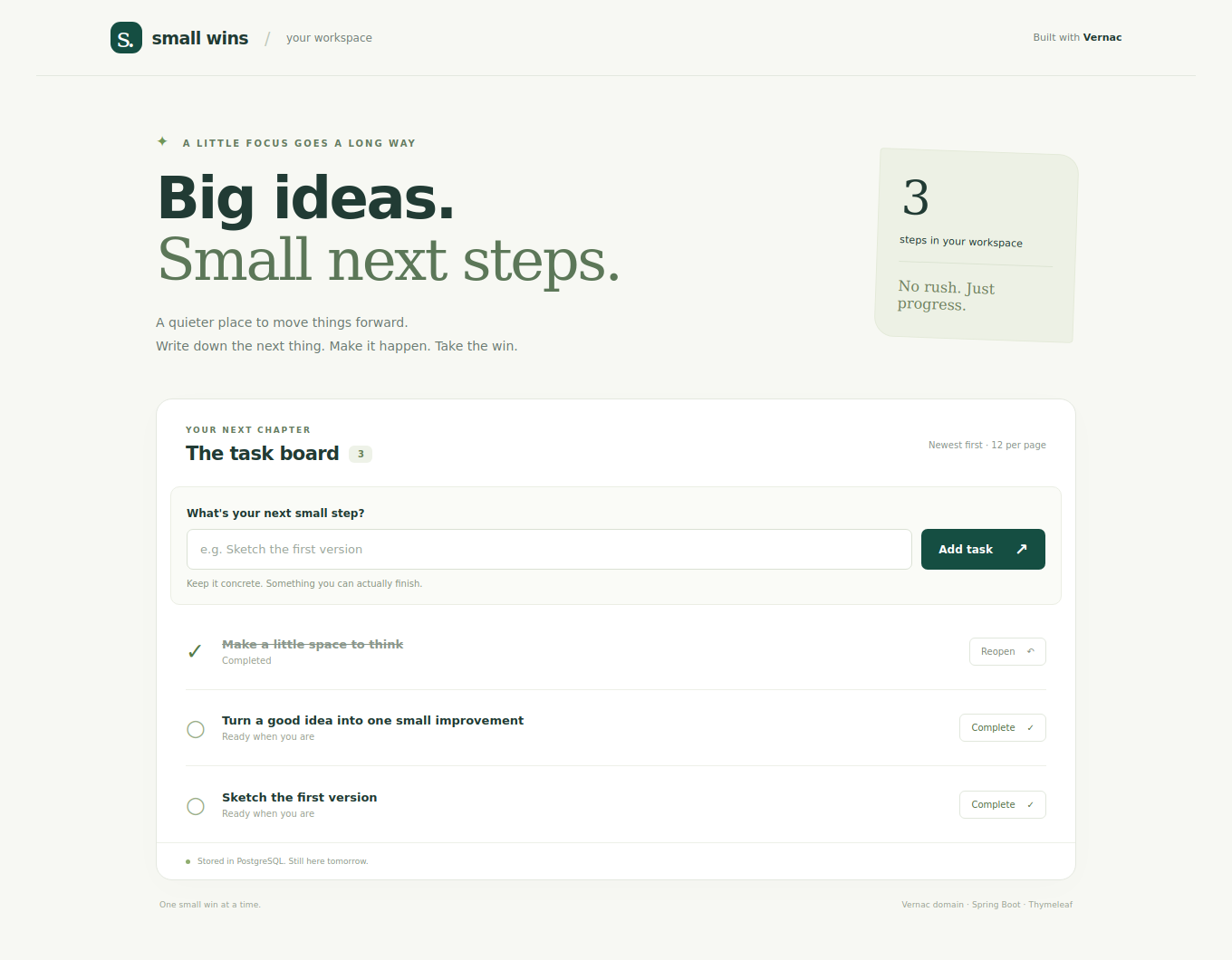
The actual Thymeleaf view rendered with sample tasks from the test fixture; this image illustrates the UI, not a completed PostgreSQL deployment test.
Start with a small win
Install the 0.5.0 plugin and matching Maven artifacts (or the matching SNAPSHOT source build) as explained in the IntelliJ guide. Select a JDK 25, enter your Maven coordinates and namespace, and keep Spring Boot Web Application selected. Docker with Compose v2 must be running. Nothing is started during project creation.
After creation, open TasksApplication and click Run. Keep the project root
as the working directory; no profile selection is required. Alternatively, open
the new project’s Maven tool window and run:
spring-boot:run
In PowerShell from the generated project root, the equivalent is:
.\mvnw.cmd spring-boot:run
The wizard delegates IDE builds/runs to Maven, which generates Vernac Java sources
before compiling them. Wait for the initial Maven import to finish and leave the
Run configuration’s Build step enabled. Subsequent .vernac edits participate
in that same lifecycle.
local is the default when no active profile is configured. Docker with Compose
must be running.
Open http://localhost:8080. The local profile starts PostgreSQL through Compose, Flyway applies the prepared baseline, and Spring serves an empty task board. Add a concrete next step, complete it, and reopen it. Restart the application: the task is still there. Add more than twelve tasks to try the numbered pages.
If the database port is occupied, choose another LOCAL_DB_PORT; PORT changes
the web port. Set these variables in the run environment, not in the domain model.
The generated README contains platform-specific commands and database reset advice.
Follow one form submission
sequenceDiagram
    participant Browser
    participant Web as Generated MVC adapter
    participant Usecase as Generated usecase
    participant DB as PostgreSQL
    Browser->>Web: POST title + CSRF token
    Web->>Web: Construct validated TaskTitle
    Web->>Usecase: CreateTask.execute(title)
    Usecase->>DB: Insert aggregate in REQUIRED transaction
    DB-->>Usecase: Commit
    Usecase-->>Web: TaskId
    Web-->>Browser: Redirect to board
    Browser->>Web: GET board page
    Web->>Usecase: ReadTasks.execute(page)
    Usecase->>DB: Load full aggregate page and count
    Usecase-->>Web: Page of immutable TaskCard values
    Web-->>Browser: Render Thymeleaf HTML
The controller adapts HTTP; it does not own transactions or business rules. The
Vernac TaskTitle rejects meaningless titles, the Task aggregate owns its status,
and each generated usecase owns its transaction. The repository persists complete
aggregates; the read usecase projects them to values before passing results to the
UI. No database connection or lazy-loaded object escapes into a template.
Open tasks.vernac and inspect both the Task behavior and the TaskWeb inbound mvc
adapter. Then open templates/board.html. The request bindings, usecase argument
conversions, view/redirect decisions and error redisplay are all declared in Vernac.
The generated controller lives under target, not in handwritten application code.
Spring Security configuration remains a small Java infrastructure class.
There is no JavaScript bundle or npm toolchain, and the assets need no external service. The exact namespace and source paths follow the wizard values. If you later need JSON endpoints, add a declarative inbound HTTP adapter calling the same usecases. The MVC tutorial explains the HTML boundary, safe form inputs, status codes and page reload behavior in detail.
Test the seams
Run clean test in the generated project’s Maven window. No Docker is needed.
Domain tests cover title rules and task transitions. The web slice exercises actual
HTML rendering, generated usecases, CSRF, escaping, validation, pagination and form
submissions, using a test-only repository. It makes no JDBC/transaction claim.
For a separate disposable PostgreSQL database, provide DB_URL, DB_USERNAME and
DB_PASSWORD, then run -Pdatabase-tests verify. This explicitly enabled test boots
the complete application and exercises its real Flyway/JDBC lifecycle. It fails if
the database cannot be reached. Do not point it at production or private user data.
Keep the first migration, then evolve
Project creation prepares the initial SQL and matching source-controlled schema history for your namespace. Later migrations therefore start from a known baseline. The wizard performs no database operation and does not execute the migration.
Try adding an optional field to the model, then run:
vernac:migration -Dvernac.migrationDescription=add_task_details
Review the SQL and history snapshot together; run a disposable replay and a test
against representative existing data before deployment. You alone are responsible
for reviewing, testing and approving migrations before applying them. Generated
candidates and automated verification do not guarantee correctness or deployment
safety. The schema-tooling tutorial explains backfills,
data-loss guards and schema-check configuration.
Prepare deployment without mixing it into the model
Set SPRING_PROFILES_ACTIVE=production for deployment. Any explicit active profile
replaces the local default. Deployment reads the database connection and
credentials from DB_URL, DB_USERNAME and DB_PASSWORD, leaves Compose disabled
and keeps secure cookies enabled. Build once with clean package; the artifact is
target/application.jar. The included Dockerfile runs that artifact as a non-root
user, selects production and sets SERVER_ADDRESS=0.0.0.0. Supply secrets externally.
The starter includes stdout logging, configurable ports and pool size, health and readiness endpoints, graceful shutdown, and secure-cookie defaults outside local development. These are foundations for twelve-factor deployment, not a claim that every operational concern has already been solved.
The board is intentionally public. Add authentication, authorization and tenant boundaries before sharing private data. CSRF and flash messages use HTTP session state; choose a shared session store or another deliberate strategy when running multiple instances. The generated README identifies these boundaries explicitly.
Next, implement one real rule in Vernac and extend the UI to make it useful. Keep
business decisions in the model, request adaptation in Java and generated output
under target.
All tutorials · IntelliJ setup
Troubleshoot an empty web boundary
If the application starts but / returns 404, check that
target/generated-sources/vernac contains TaskWeb.java. The Java application
class can compile on its own even when no Vernac controller was generated.
In an older project or a checkout, enable Delegate IDE build/run actions to
Maven in Settings → Build, Execution, Deployment → Build Tools → Maven →
Runner. Then run clean compile once in that application’s Maven window and
restart. The wizard configures delegation for new projects; opening existing
projects does not overwrite your chosen build settings.