Evolve a Vernac database with Flyway
Start by running the database persistence tutorial. Keep its database volume: existing data is what makes this exercise useful.
You alone are responsible for reviewing, testing and approving every migration before applying it. Inspect operation ordering, existing data, application compatibility, locking, duration, backups and recovery. Vernac produces candidates; generation and automated verification are not correctness or deployment guarantees.
The three artifacts
| Artifact | Role |
|---|---|
.vernac model |
Desired domain and generated storage layout |
src/main/vernac-schema/history/*.json |
Versioned schema snapshots used to generate the next diff |
src/main/resources/db/migration/*.sql |
Reviewed SQL migrations applied by Flyway |
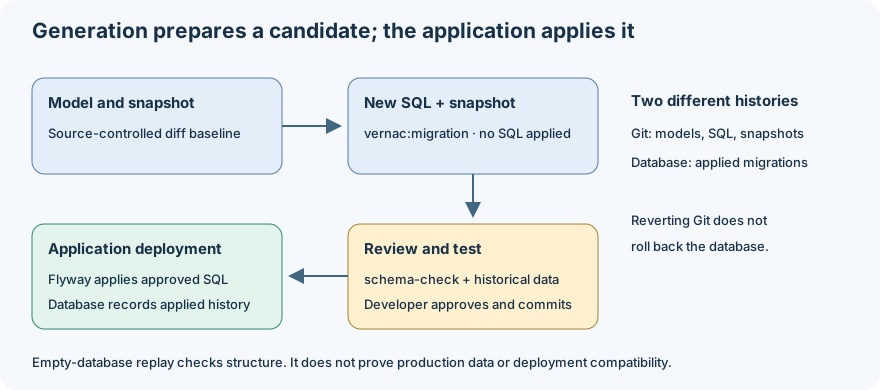
Commit SQL and its matching snapshot together. Flyway maintains applied versions and
checksums in public.flyway_schema_history. Vernac does not mutate your database when
running schema or migration; this example applies migrations at application startup.
1. Confirm the initial version
The example includes V20261009090000000__initial_delivery.sql and its matching JSON.
Run the application once, then inspect the history using psql:
SELECT version, description, success FROM public.flyway_schema_history;
SELECT "id", "title" FROM "org.example.delivery"."Tour";
Connect to the delivery application database on port 55433, not postgres
or the disposable schema-check databases. From the example directory,
docker compose exec postgres psql -U delivery -d delivery opens the right database.
Keep one existing Tour ID so you can confirm it survives the migration.
2. Add an optional field
The prepared V2 model adds:
value DispatchReference(String);
and a Tour field mut DispatchReference? reference, plus an assignReference behavior.
The convenience create factory’s required parameters stay unchanged.
From the example directory, use PowerShell to replace the tutorial model:
Copy-Item .\migration-demo\model-v2.vernac .\src\main\vernac\org\example\delivery\model.vernac
This replaces the example model; preserve your own edits first if you experimented
with it. The V2 file lives outside src/main/vernac so it is not compiled prematurely.
3. Generate the next migration candidate
From the example directory:
mvn vernac:migration -Dvernac.migrationDescription=add_dispatch_reference
In a PowerShell terminal, quote the complete dotted argument:
mvn vernac:migration "-Dvernac.migrationDescription=add_dispatch_reference".
In IntelliJ’s Maven command field use the unquoted Maven arguments.
Vernac compares the current model with the last committed schema snapshot. The new
SQL should add a nullable reference TEXT column to Tour. Unchanged constraints and
entity tables should remain untouched. Inspect both newly created files.
Do not replace V1 with a regenerated initial schema. Do not edit a migration already applied to a shared database. Generate a subsequent migration instead.
4. Verify against disposable databases
The schema-check goal creates two fresh databases on a test PostgreSQL server. It
replays all migrations with Flyway in one and creates the expected target schema in
the other, then compares the managed structures. Both temporary databases are removed.
The supplied role needs CREATEDB; do not use production credentials.
For this local Compose example, the development role has that capability. In PowerShell, set the variables in the same terminal that runs Maven:
$env:VERNAC_CHECK_URL = 'jdbc:postgresql://localhost:55433/postgres'
$env:VERNAC_CHECK_USER = 'delivery'
$env:VERNAC_CHECK_PASSWORD = 'local-demo-only'
mvn vernac:schema-check
For IntelliJ’s Maven window, put the same variables in its Maven run configuration. The terminal environment and the already-running IDE do not automatically share newly assigned environment variables.
This structural check does not prove compatibility with real historical data or
production operational constraints. It does not apply changes to the delivery
database. Test the reviewed script with representative data as well.
5. Apply through Flyway and keep the old data
mvn spring-boot:run
Flyway applies only the new migration before the runner executes. Query:
SELECT version, description, success FROM public.flyway_schema_history ORDER BY installed_rank;
SELECT "id", "title", "reference" FROM "org.example.delivery"."Tour";
The original Tour is still there; its new field is NULL. The new generated getter is
Optional<DispatchReference> reference(). A usecase can now call
tour.assignReference(DispatchReference.of("DISPATCH-2026-001")) and save(tour).
6. Required or destructive changes
Adding a required column to a table with existing data needs an explicit backfill.
Use a JSON file with backfills and conversions, passed with
-Dvernac.transformations=path/to/transformations.json. Keys are logical
namespace/table/column identities; expressions are reviewed SQL. See the
schema-tooling reference for the exact format.
Dropping tables/columns and potentially lossy conversions stop candidate generation
unless you pass -Dvernac.force=true. Force only lets generation continue despite
identified risks. It does not approve or execute the migration, invent missing
transformations, guarantee success, or transfer responsibility away from you.
Working with other developers
Commit migrations and snapshots together, and check the history after pulling. If two branches generate migrations from the same predecessor, Vernac reports the history divergence. Rebase the unpublished change, regenerate its candidate on top of the accepted history and review it again. Never silently rewrite published history.
A suitable CI gate is model compilation, schema-check against disposable PostgreSQL,
and the database integration tests. The goal is available explicitly; Vernac does not
silently require a running database for every ordinary Maven build.
Automated regression: adding a required field to existing data
RequiredFieldBackfillTest in vernac-maven-plugin keeps its own V1/V2 models
under test resources. It does not modify the persistence demo or its migration
history. Both versions are generated and compiled independently. The ordinary
(non-database) test also verifies that migration generation refuses a new required
column without an explicit backfill expression.
The PostgreSQL test creates a uniquely named disposable database, applies only V1,
and saves a complete aggregate through the generated V1 repository. It then uses
Flyway to apply the generated V2 candidate with the reviewed test expression
'LEGACY-' || "id"::text. It checks the stored reference, the NOT NULL constraint,
and loading through the generated V2 repository, including the original fields,
persistence version, list multiplicity and shared entity identity. A repeat Flyway
run must apply no additional migrations. The temporary database is dropped afterward.
Start the existing test server from the repository root in PowerShell:
docker compose -f examples/persistence-demo/compose.yaml --profile test up -d --wait postgres-test
Set these environment variables in the IntelliJ Maven run configuration:
VERNAC_PG_TEST_URL=jdbc:postgresql://localhost:55434/postgres
VERNAC_PG_TEST_USER=delivery
VERNAC_PG_TEST_PASSWORD=local-demo-only
These are the supplied local test credentials. The connection is used to create and drop a separate database; the role needs CREATEDB. Run from the repository root:
mvn -pl vernac-maven-plugin -am test -Dtest=RequiredFieldBackfillTest -Dsurefire.failIfNoSpecifiedTests=false
Expect two tests without skips when the database environment is configured.
Without VERNAC_PG_TEST_URL, the compilation test still runs and the PostgreSQL
test is explicitly skipped. This test exercises a populated V1 database, whereas
schema-check replays migrations into empty databases to compare schema structure.
Neither substitutes for reviewing and testing a migration against representative
application data and deployment conditions; approval remains your responsibility.
When undoing a local tutorial experiment, remember that reverting source files
also leaves the previously migrated database unchanged. Use a matching disposable
database state and a Maven clean to remove obsolete copied migrations from
target/classes. Never rewrite shared migration history to reconcile experiments.
Repeat the exercise without mixing database histories
Reverting files is not a database rollback. Before repeating the V2 exercise:
- Confirm the datasource URL, port 55433, and application database delivery. The schema-check databases and the PostgreSQL administrative database are different.
- Restore the baseline model and remove only unpublished local experiment SQL
and its matching snapshot. Run
mvn cleanto remove copied SQL intarget/classes. - If V2 was already applied, either retain a matching V2 source history or reset the explicitly disposable demo database. Preserve real/shared data and use a forward migration there; never delete applied shared history to repair an experiment.
- Restart and inspect
public.flyway_schema_historyin delivery, then check the application tables. An empty baseline should apply only the committed initial migration before the runners execute.
For a throwaway local demo, inspect docker compose config --volumes from the example
folder before using docker compose --profile test down --volumes. This removes the
project’s Compose volumes, including test data; it is not a general recovery command.
Do not run it if you need any data stored in those volumes. Recreate the local services
with Compose and restart the application only after source history is consistent.